T3 Code Sidebar V2: Inbox-Style Threads for Agentic Coding
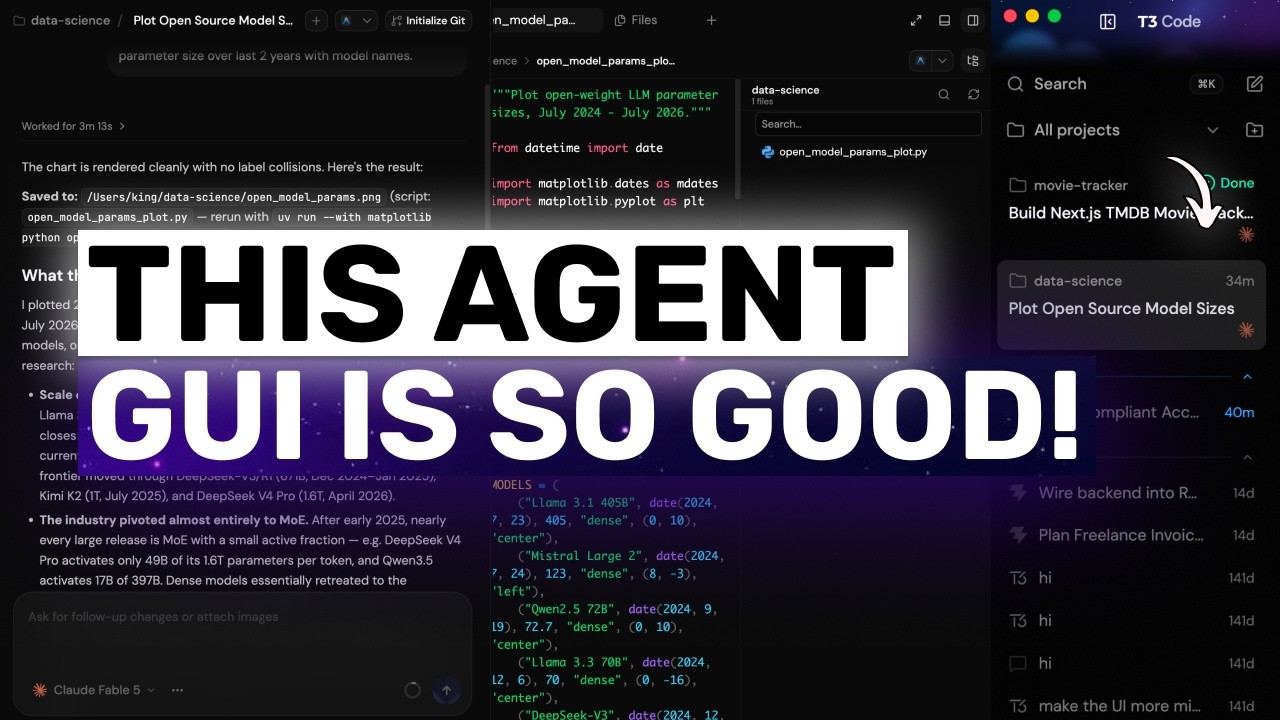
T3 Code's nightly build ships a rebuilt left sidebar the team calls Sidebar V2. The old sidebar grouped threads under project names, which turned into a long, permanently-expanded tree once you had a few projects and a pile of old threads. The new one is a single flat list in creation order: threads you're actively working on render as rich cards at the top, and finished work collapses into a "Settled" section of compact rows. It's a beta toggle, not on by default.
"T3 Code V2 + Claude, Codex: YOU'RE MISSING OUT ON ONE OF THE BEST Agentic GUI Experiences RIGHT NOW!" by AICodeKing — Watch on YouTube →
How to Enable It
Go to Settings → Beta and flip the Sidebar V2 toggle. The sidebar switches layout instantly — no restart required — and you can switch back from the same place if you don't like it. Two more options appear underneath once it's on.
The settling behaviour requires an up-to-date server. On older servers the toggle still works, but threads simply stay active and never settle.
Key Takeaways
- Flat list, not a project tree. Active threads render as rich cards showing project name, thread age, thread title, and an activity indicator. Everything finished drops into a compact "Settled" list below.
- Auto-settle runs on a timer you control. Any thread with no activity for a set number of days settles automatically — the default is 3 days, and the number is editable. Threads on merged or closed PRs always settle on their own.
- Settling is reversible and self-correcting. New activity on a settled thread unsettles it automatically and pops it back to the top as a card. Manually, hovering a card exposes a settle button; hovering a settled row exposes an unsettle arrow.
- Snooze, for work you're not done with but don't want to see. The clock icon on an active card offers 1 hour, tomorrow at 9:00, or next week on Monday at 9:00.
- Right-click menu on any thread covers: start a new thread on main, unsettle, snooze, rename, mark as unread, and delete.
- The Settled section doesn't dump everything on you. It shows recent threads with a "show more" button that reports how many are still hidden, and the whole section collapses to a single line with a count.
- Project filter replaces project grouping. A dropdown at the top defaults to "All projects" and filters the whole list to one project instantly; an add-project button sits next to it.
- Search spans more than threads.
Cmd+Kopens a palette that searches commands, projects, and threads together, showing which project and branch each hit belongs to. - New threads are two keystrokes. The compose button opens a project picker where every project gets its own shortcut (
Cmd+1,Cmd+2, and so on). - Beta, nightly-only. Expect rough edges — though the reviewer's take after testing was that it already feels solid and he saw no reason to switch back.
Shortcuts & Controls Shown
Settings → Beta → Sidebar V2      # enable (instant, no restart)
Settings → Beta → Auto settle     # settle after N days of no activity (default 3)
Cmd+K                             # search commands, projects and threads
Cmd+1 / Cmd+2 / ...               # compose a new thread in project 1, 2, ...
Hover card  → settle button       # manually settle an active thread
Hover card  → clock icon          # snooze 1 hour / tomorrow 9:00 / Monday 9:00
Hover row   → unsettle arrow      # bring a settled thread back as a card
Right-click → new thread on main | unsettle | snooze | rename | mark unread | delete
Why It Matters for Agentic Workflows
The reviewer's argument is that project-grouped navigation made sense when you had one or two projects, but it doesn't match how agentic coding actually runs: you fire off a batch of threads, some are still running, some are done, and the sidebar should reflect that state rather than acting as a folder tree. An inbox model where active work floats up and finished work settles down is a closer fit — and the auto-settle plus PR-close rules mean the sidebar cleans up after itself instead of accumulating.
More OpenClaw & Claude Code news
 Your agent can pay: six attacks on x402 payments (price swap, duplicate payment IDs, free shopping, cache, look-alike sellers, prompt injection) and the fix for each
 Claude Code effort levels tested: the same Opus 5.5 build at low, medium, high, extra high and max
 Telling Claude to "make it better" 100 times: the exact prompt, a clean-room setup, and where Sonnet and Opus 5.5 started overbuilding
 Qwen Audio Agent as a voice front end for Claude Code: install, config.env, gateway, and what interruption and cancel really do
 A nightly security sweep with headless Claude Code: logs into S3 and Athena, read-only access, and a green/yellow/red Slack report
 When to fold sub-agents into one agent loop: the decision test, plus Panda Code single chat versus team mode